


206 Views
Key Points:
- Major technology upgrades can expose hidden limits in older cabling systems.
- Early cable mapping helps prevent crowded pathways and unexpected capacity issues.
- Existing cabling should be reviewed before adding new devices and systems.
- Copper and fiber choices should match speed, distance, traffic, and growth needs.
- Organized telecom rooms make troubleshooting and future equipment changes easier.
- Certification testing helps find weak links before the upgraded network goes live.
- Phased installation reduces disruption across active departments and work areas.
- Spare ports, rack space, and pathway capacity support future technology growth.
- Clear records and regular maintenance help prevent bottlenecks from untracked changes.
Major technology upgrades can place heavy pressure on a commercial network. New cloud tools, wireless access points, security devices, video systems, and connected equipment may all depend on the same cabling backbone. If that backbone is poorly planned or already near its limit, teams may face slow data transfer, unstable connections, and unexpected outages. These problems can delay the rollout and make a valuable upgrade feel less effective than expected for everyday business users.
A structured approach helps prevent those issues before equipment is installed. The work begins with a clear review of the current network, the planned technology, and the traffic each system will create. Pathways, cable types, telecom rooms, and switch locations must support both current needs and future expansion. When these details are handled early, commercial teams can upgrade with fewer delays, less rework, and much more confidence in reliable long-term performance.
Cabling Upgrade Mapping That Prevents Hidden Capacity Problems
A skilled cabling contractor maps every new connection before installation begins. They review device counts, work areas, switch capacity, wireless coverage plans, and the location of shared systems. This prevents too many devices from being pushed through a limited pathway or crowded telecom room. It also helps the business understand where new cable runs, patch panels, racks, or fiber links may be needed to support the planned technology properly from day one onward.
Read More: AI Customer Service Agent Implementation: A Step-by-Step Guide
Pathway planning is just as important as selecting the cable. Conduit size, tray space, ceiling access, riser capacity, and separation from electrical lines can affect both performance and installation time. If these limits are missed, crews may discover blocked routes after materials arrive. Early planning allows them to choose practical paths, schedule access, and protect active work areas. It also leaves enough room for future additions without reopening finished ceilings.
Existing Infrastructure Needs a Full Review
Older cable runs may still function, but that does not mean they can support a major upgrade. Some links may have damaged connectors, poor terminations, unclear labels, or categories that limit speed. Telecom rooms may also be crowded or poorly organized. A full assessment shows which parts can remain, which need repair, and which should be replaced before new systems begin placing more demand on the network during normal daily business use.
The review should also connect technical findings with business plans. A company may be adding employees, moving departments, installing cameras, expanding Wi-Fi, or shifting more work to cloud platforms. Each change affects ports, bandwidth, and equipment placement differently. When the team understands those plans, it can avoid fixing only the most visible problem and instead build a backbone that supports the complete upgrade without creating another costly bottleneck soon after launch.
Cabling Contractor Choices That Match Network Demand
Major upgrades often combine several types of traffic on one network. Voice, video, cloud applications, cameras, access control, and wireless devices may all have different speed and reliability needs. A cabling contractor in Austin can help separate those demands and choose suitable copper or fiber connections for each part of the project. This reduces the chance that one high-traffic system will slow down other important tools used across the wider business.
Cable selection should be based on distance, bandwidth, equipment needs, and expected growth. Category-rated copper may suit many office connections, while fiber can support longer runs, backbone links, and high-capacity areas. The goal is not to choose the most expensive option everywhere. It is to use the right medium in each location so the network delivers stable performance without unnecessary costs or limits appearing soon after the project is complete.
Organized Telecom Rooms Speed Troubleshooting
Telecom rooms are central points for network traffic, so poor organization can quickly create delays. Overfilled racks, tangled patch cords, weak airflow, and unclear port labels make changes harder and increase the risk of mistakes. Clean rack layouts and planned patching help technicians trace connections quickly. They also make it easier to add switches, replace equipment, or isolate a failed link without disturbing unrelated systems during a busy workday or planned upgrade.
Documentation supports that organization long after the upgrade ends. Port maps, cable labels, test results, rack layouts, and as-built drawings give the internal IT team a reliable view of the network. A cabling contractor should make those records clear enough for future service teams to follow. Good documentation reduces guesswork, shortens troubleshooting time, and prevents small changes from turning into confusing cable paths that are difficult to manage later on.
Testing and Phased Work Protect Operations
Testing confirms whether each installed link can support the planned technology. Visual checks alone cannot reveal every weak termination, damaged pair, or signal loss issue. Certification testing helps verify cable performance before devices are fully moved onto the new network. When faults are found early, technicians can repair them while ceilings, racks, and work areas are still accessible. This protects the rollout schedule and reduces problems after employees begin using the upgraded systems daily.
A careful rollout also limits disruption to normal business activity. Teams may stage work by floor, department, or system so the entire property is not changed at once. A cabling contractor in Austin can coordinate access windows, temporary connections, and testing around occupied areas. This phased approach gives the project team time to confirm each section before moving forward, making it easier to correct issues without affecting every user at once.
Future Capacity Keeps Upgrades Working Longer
Technology upgrades rarely end with the first launch. Businesses add users, devices, software, and security tools as their needs change. A network built with spare ports, open rack space, accessible pathways, and extra backbone capacity can handle those changes more easily. Planning for growth does not mean overbuilding every area. It means identifying likely expansion points and giving the company practical options when new demands appear over the next several years.
Read More: How RPA Service Providers Are Revolutionizing Business Efficiency
Maintenance also protects the value of the upgrade. Cable records should be updated when teams move, equipment changes, or new connections are added. Telecom rooms should remain clean, secure, and easy to access. Periodic testing can help find damaged links before they affect a larger group of users. When the physical network is treated as active infrastructure, the business is less likely to face hidden bottlenecks caused by years of untracked changes.
A Stronger Backbone Supports Better Upgrades
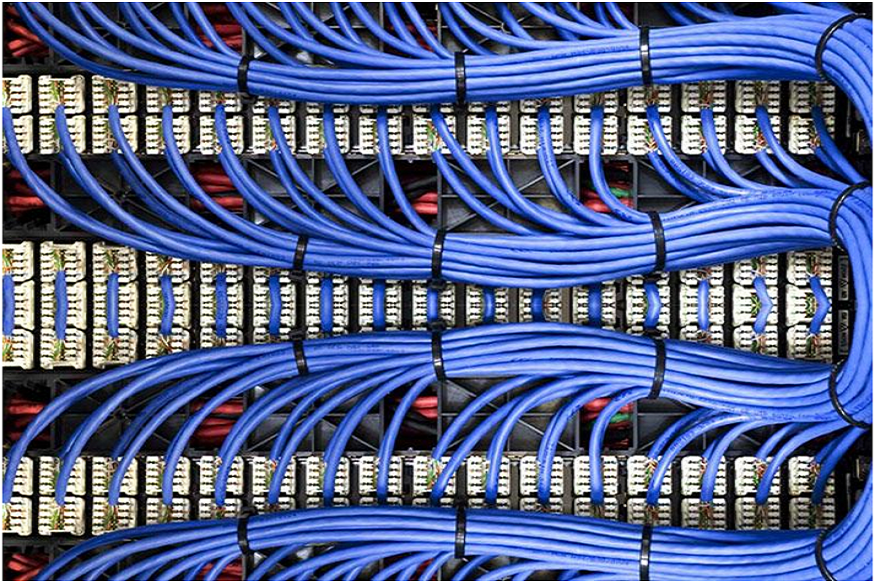
Avoiding network bottlenecks during a major technology upgrade requires more than fast equipment. The cabling backbone must be reviewed, designed, installed, tested, and documented around real business use. Strong pathways, suitable cable choices, organized telecom rooms, and a phased rollout all help the new technology perform as intended. They also reduce downtime, control unexpected costs, and give commercial teams a clearer foundation for future changes, steady growth, and easier network management.
CMC Communications supports commercial technology upgrades with structured cabling, fiber installation, testing, and network planning services in Austin. Their team can assess existing infrastructure, design practical pathways, install copper or fiber links, organize telecom spaces, and certify completed connections. By linking the physical network to current and future technology needs, they help businesses reduce bottlenecks, simplify troubleshooting, and complete upgrades with less disruption to daily operations and future expansion plans.
Frequently Asked Questions
Question: What should businesses review before a major network upgrade?
Answer: They should review existing cable types, telecom room capacity, switch locations, pathway space, device counts, and future growth plans. It is also helpful to identify weak links, undocumented runs, and areas where new systems will create more traffic. This gives the project team a clearer starting point.
Question: Can old cabling stay in place during an upgrade?
Answer: Some existing runs may remain if they are properly tested, clearly labeled, and suitable for the required speed and distance. Damaged, outdated, or poorly terminated links may need replacement. A full assessment helps teams avoid removing useful infrastructure while still correcting the parts that could limit performance.
Question: Why are telecom rooms important during technology upgrades?
Answer: Telecom rooms connect many parts of the network. Crowded racks, unclear labels, poor airflow, and tangled patching can slow troubleshooting and increase the risk of mistakes. Organized rooms make it easier to add equipment, trace connections, test links, and complete future changes with less disruption.
Question: How does phased installation reduce business disruption?
Answer: Phased work divides the upgrade by floor, department, or system. Teams can test each section before moving to the next one, while temporary connections support active users when needed. This approach limits the number of people affected at one time and makes problems easier to correct.
Question: What records should be kept after the project?
Answer: Businesses should keep cable test reports, port maps, rack layouts, pathway details, labels, and final as-built drawings. These records help internal IT teams and future service providers understand the network quickly. Clear documentation also reduces troubleshooting time and supports smoother moves, additions, and later upgrades.